
Contacts - Phone Calls
array infotechCommunication
4.412.00 Reviews
- Version
- 1.0.5
- Installs
- 50.00K
- Age Rating
- Everyone
Screenshots
Our Review of Contacts - Phone Calls
 Analysis by Appyee
I approached Contacts - Phone Calls as a practical replacement for the standard phone app rather than as a complete messaging platform. Its focus is straightforward: making calls, handling contacts, replying quickly, and giving the incoming-call experience a more personal look. That sounds simple, but the everyday phone app is something I open under pressure, often while walking, driving as a passenger, or trying to find one person among a crowded address book. Small improvements matter there.
After spending time with it, my view is that this is most interesting for people who want more control over the calling screen without moving to a complicated communication suite. It is a free communication app from array infotech, rated for Everyone, and its current version is 1.0.5. The app has passed the early curiosity stage with over 50 thousand installs and an average rating of 4.4 from more than 300 ratings, so there is at least a useful level of interest around it.
What I looked for before recommending it
My first decision criterion was speed. A dialer should not make a routine call feel like a small project. I looked at how naturally the main calling tools fit together, whether contact handling felt like part of the same workflow, and whether quick replies could save time when answering was inconvenient. I also paid attention to the call styles because visual customization is only helpful when it remains easy to understand.
The second criterion was the relationship with the phone’s usual tools. A replacement dialer has to earn its place every day. If I still need to open the default contacts app for basic tasks, or if switching between the two creates confusion, the extra styling is not enough. This is especially important for people with a large contact list, several frequently called people, or work and personal numbers mixed together.
The third criterion was the kind of user experience the app is trying to create. Contacts - Phone Calls is not positioned as a social network, a video-calling service, or a full text-messaging replacement. I judged it as a focused phone-call utility. That makes the relevant question less “does it do everything?” and more “does it make ordinary calls and contact access more comfortable than the phone tool I already have?”
I also considered the cost of changing. The app itself is free, but time is still a cost. Any phone utility has to be learned, adjusted, and trusted before it becomes part of a routine. A person who only makes occasional calls may not notice enough benefit to justify that change. Someone who calls throughout the day may appreciate even a small reduction in tapping and searching.
The dialer is useful when calling is the main task
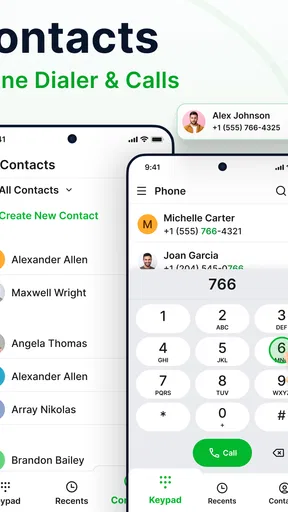
The strongest part of the concept is the combination of a dialer and contact management in one communication-focused app. I like this approach because it reflects how people actually use a phone: sometimes I know the number and want a keypad, while other times I remember only a name and need to search. Keeping both paths close together is more practical than treating them as unrelated activities.
For a person who regularly calls family members, clients, delivery drivers, or local services, the value is not one dramatic feature. It is the ability to move from “I need to contact this person” to the call screen with less hesitation. The app’s emphasis on contacts also makes it more appealing than a bare keypad that assumes I already remember every number.
One useful habit is to treat the contact list as the starting point for a calling routine. Instead of opening the dialer first and then searching, I would begin with the person I need, check that I have the right contact, and call from there. That is particularly helpful when names are similar. It reduces the chance of dialing the wrong person simply because two entries sit next to each other in a recent-call list.
There is a trade-off, though. A more feature-focused calling app can feel slightly busier than the phone tool that came with a device. Users who want only a large keypad and almost no visual decisions may prefer the default option. Contacts - Phone Calls makes sense when its added contact and presentation tools solve a real annoyance, not merely because it is different.
Quick reply matters most when I cannot answer
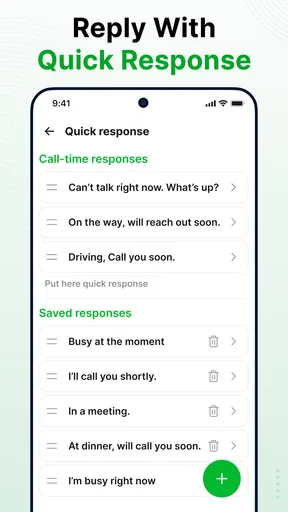
Quick reply is one of the more practical inclusions because missed calls often happen at inconvenient moments. I may be in a meeting, carrying groceries, helping a child, or already speaking to someone else. In those situations, answering is not realistic, but ignoring the call without context can create another problem.
The useful workflow is simple: see who is calling, decide that the call has to wait, and send a short response rather than opening a separate messaging conversation from scratch. That can turn an interruption into a clear next step. A message such as “I’ll call you later” is not a replacement for a conversation, but it can prevent uncertainty.
I would use this feature selectively. It is best for predictable situations where a brief response is enough. It is less suitable for sensitive conversations, complicated explanations, or anything that needs a carefully worded message. The quicker a reply is, the easier it is to send something too vague or too casual, so I would still review the wording before using it with a professional contact.
A less obvious benefit is that quick replies can help separate urgency from availability. If I acknowledge a call without taking it, I am giving the other person a signal that the call was noticed. That is valuable for family and work contacts, but it should not become an automatic response to every caller. A short reply is useful only when it communicates something accurate.
Call styles add personality, but clarity should come first
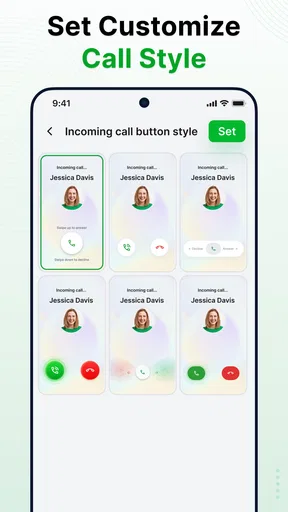
The call-style options are the part that will attract users who find standard incoming-call screens dull or difficult to distinguish. A different presentation can make the calling experience feel more personal, and it may help the app stand out from a basic system dialer. I found this appealing in moderation.
My advice is to choose a style that keeps the caller’s identity and the answer or decline actions immediately obvious. Decorative changes are not worth much if they slow down the decision to pick up. This is especially important for older users, people with limited vision, or anyone who often answers while distracted. The best style is not necessarily the most dramatic one; it is the one I can understand at a glance.
There is also a practical reason to avoid changing the appearance too often. When an incoming call looks different every day, muscle memory becomes less reliable. I would select one comfortable style, use it for several days, and judge it during real calls rather than choosing based only on how attractive it looks while browsing settings.
This is where Contacts - Phone Calls wins over a strictly minimal default dialer: it gives the phone experience a visible identity. But it may lose against a system app for someone who values absolute consistency above customization. The choice depends on whether the incoming-call screen feels like a personal workspace or simply a utility that should never draw attention.
Everyday scenario: handling a call during a busy afternoon
Imagine I am leaving a shop with both hands occupied when a saved contact calls. I cannot comfortably hold a conversation, but I also do not want the person to assume I missed the call. The useful sequence is to recognize the contact, decline or postpone the call, and use a quick reply to set expectations. Later, I can return to the contact rather than trying to reconstruct who called from memory.
That scenario shows why the app is more than a visual dialer. The contact record, call action, and quick response belong to the same small task. The app is most convincing when those pieces reduce friction in a moment where attention is limited. It is not about making phone calls exciting; it is about making the surrounding decisions less awkward.
Another realistic use is a shared household phone where several people rely on a familiar contact list. A clear contact workflow can be easier than asking someone to remember which number belongs to a service provider or relative. I would still keep contact names consistent and remove outdated entries regularly, because no dialer can compensate for a messy address book.
Who should choose it, and who should skip it
I would recommend Contacts - Phone Calls to someone who makes ordinary phone calls often and wants the dialer, contacts, quick responses, and call presentation to feel like one experience. It is also a reasonable choice for users who find the standard calling screen too plain and want a little more control without paying for the app.
It may suit people who frequently postpone calls. Parents, busy workers, service professionals, and anyone whose day is divided into short tasks can benefit from having a quick way to acknowledge a caller. The app is also approachable for users who want a focused communication tool rather than a large platform filled with unrelated functions.
I would be more cautious about recommending it to someone who is completely satisfied with the phone app already installed on their device. If the current dialer finds contacts quickly, handles missed calls well, and offers enough customization, changing may create more adjustment than benefit. I would also skip it if my priority were video calls, group chats, encrypted conversations, or a unified inbox for every communication service. This app’s appeal is specifically around phone calls and contacts.
Users who depend on highly specialized accessibility behavior should test the interface carefully before making it their main dialer. A customized call screen can be helpful, but it can also feel unfamiliar compared with the system layout. For that audience, predictability is more important than appearance, and the default phone application may remain the safer fit.
How it compares with the usual alternatives
The obvious alternative is the phone app already supplied with the device. That option usually has the advantage of familiarity: I already know where the keypad is, where recent calls appear, and how the system handles incoming calls. It is the best choice for people who want the least possible change and who do not need extra presentation options.
Contacts - Phone Calls is more appealing when I want a dedicated focus on contact access, quick replies, and call styles. The difference is not necessarily that one approach is universally faster. It is that this app gives more attention to the steps around a call, especially deciding whether to answer and how to respond when I cannot.
Another alternative is a broader messaging app. Those services can be better for ongoing conversations, media sharing, group communication, or internet-based calls. They are not direct substitutes for a phone-call utility when I need to reach a regular number or manage a conventional contact list. Choosing between them depends on the communication problem I am trying to solve.
A minimalist third-party dialer may be preferable for someone who wants a clean keypad and nothing else. Contacts - Phone Calls has a wider scope within phone calling, which can be an advantage for a busy user but unnecessary for someone who rarely calls. I would compare them by asking one practical question: do I need help with the call before and after pressing the call button, or only the button itself?
What switching actually involves
The financial barrier is low because the app is free. The more important cost is setup and habit. I would begin by using it for a few routine calls rather than immediately depending on it for every important conversation. That gives me time to see whether contact search feels natural, whether the preferred call style is readable, and whether quick replies fit the way I communicate.
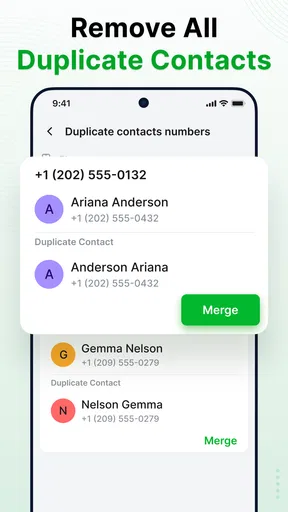
I would also clean up contacts before judging the app. Duplicate names, old numbers, and inconsistent labels can make any contact manager appear unreliable. A simple review of the address book creates a fairer test and makes the app more useful afterward. This is one of the easiest improvements a new user can make, and it does not require advanced knowledge.
During the first few days, I would pay attention to three moments: finding a person from the contact list, responding to an unanswered call, and recognizing an incoming caller quickly. Those are better tests than simply opening the settings screen. If the app saves effort in those moments, the switch is probably worthwhile. If it adds hesitation, I would return to the familiar phone tool.
The app was released on April 28, 2026, and the current version is 1.0.5. That places it in a relatively early stage of its product life, so I would keep expectations sensible and allow room for the experience to evolve. The developer, array infotech, has created a focused starting point, but a new user should still judge the current workflow on their own device rather than assuming every phone will feel identical.
Small habits that make the app more useful
My first tip is to keep the contact list intentional. Save names in a way that makes them identifiable at a glance, especially when several people share a surname or when a business has multiple numbers. This improves the app’s central job more than endlessly changing call styles.
My second tip is to reserve quick replies for situations with a clear promise. If I write that I will call soon, I should be reasonably certain I can do so. Otherwise, a neutral message is more honest. The feature works best as a communication bridge, not as a way to dismiss every interruption automatically.
My third tip is to choose the call style under realistic conditions. I would test it with the phone at arm’s length, in bright and dim surroundings, and while moving through a normal day. A style that looks excellent in a quiet room may be less useful when I need to identify a caller quickly.
A fourth useful habit is to separate evaluation from novelty. The first impression may come from the visual changes, but the long-term value comes from contact retrieval and call handling. After the newness fades, I would ask whether I still reach people more comfortably. If the answer is no, the default dialer may be the better tool.
My recommendation for different kinds of users
For frequent phone callers, I think Contacts - Phone Calls is worth trying. The combination of a dialer, contact management, quick reply, and customizable call styles gives it a clear purpose. It is especially attractive when the standard phone experience feels too limited but a full messaging platform would be excessive.
For occasional callers, my recommendation is conditional. Try it if the current phone app frustrates you or if missed calls often need a quick acknowledgment. Otherwise, the benefit may be too small to justify changing a familiar routine. Free access makes experimentation easy, but free does not automatically mean necessary.
For users choosing between this app and a messaging service, I would keep both categories separate. Use Contacts - Phone Calls for conventional calls and contact-centered tasks; choose a messaging platform when the conversation itself, media, groups, or internet calling is the priority. Neither choice has to replace the other.
The Everyone age rating also makes the app approachable for a broad household audience, although each person should still decide whether the interface feels comfortable and clear. A phone utility succeeds when the person holding the device can act without stopping to decode the screen.
My final view is positive but measured. Contacts - Phone Calls does not need to become an all-purpose communication hub to be useful. Its best quality is that it concentrates on the small decisions surrounding a phone call: finding the right person, presenting the incoming call clearly, and responding when answering is not possible. If those moments are a daily source of friction, this is a sensible free app to test.
I would not switch simply for decoration, and I would not recommend it as a replacement for tools built around chats or video conversations. But for someone who wants a more flexible Android phone dialer and a contact workflow that feels more deliberate, Contacts - Phone Calls offers a convincing reason to move away from the default. My advice is to try it with ordinary calls first, keep the clearest call style, and let the usefulness of the routine—not the novelty of the interface—make the final decision.
Verdict
Strengths of Contacts - Phone Calls
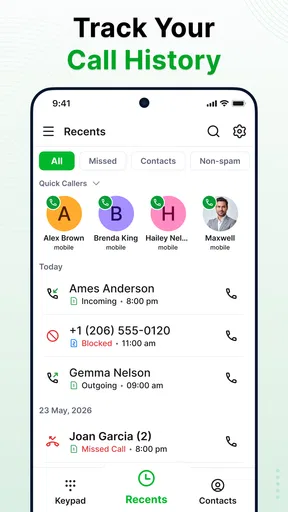
- Quick access to contacts, recent calls, and the dial pad
- Makes calling saved numbers simple and convenient
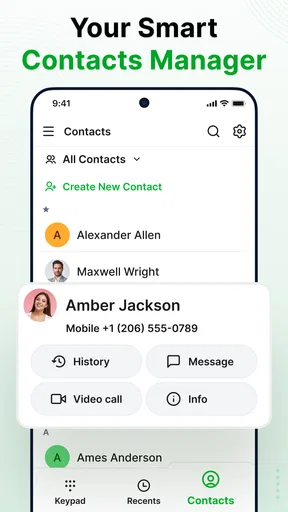
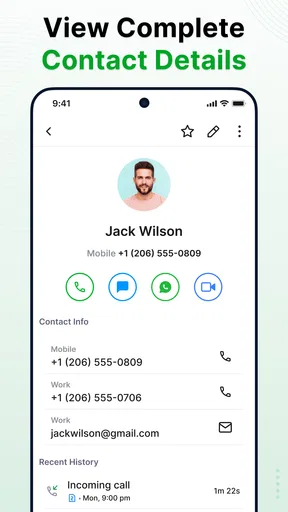
- Supports contact organization for easier daily communication
- Clear interface is suitable for users of different ages
- Useful for managing calls without opening separate apps
Limitations of Contacts - Phone Calls
- Some features may vary depending on the device and Android version
- Duplicate contacts can make the address book harder to manage
- Call history may become cluttered after frequent phone use
- Advanced options may take time to find in the settings
- The app depends on phone permissions to work correctly
Similar Picks in This Category
View All
Google Messages
Google LLC4.6

Gmail
Google LLC4.1

Google Meet
Google LLC4.4

Google Chrome
Google LLC4.1

WhatsApp Messenger
WhatsApp LLC4.6

Carrier Services
Google LLC4.2
Frequently Asked Questions
What is Contacts - Phone Calls, and what can it do?
Contacts - Phone Calls is a communication app designed to help you manage your address book and place phone calls from one convenient interface. After reviewing its core features, the app appears focused on quick access to saved contacts, contact searching, and dialing. Depending on your device and installed version, it may also support contact organization, recent calls, favorites, and standard calling shortcuts.
Does Contacts - Phone Calls require access to my contacts and phone functions?
Yes, the app generally needs permission to read your contacts so it can display names, numbers, and saved contact details. It may also request access to phone functions, call history, or the microphone, depending on the features available in your version. Before accepting permissions, review the Android or iOS privacy dialog and allow only access that matches how you intend to use the app.
Can I make calls directly from Contacts - Phone Calls?
The main purpose of Contacts - Phone Calls is to make calling contacts faster, so users can normally select a saved person and start a phone call through the device’s standard calling service. The app does not necessarily provide free internet calling. Regular carrier charges, mobile minutes, roaming fees, or plan restrictions may still apply, and the exact calling behavior can vary by device and operating system.
Is Contacts - Phone Calls free to download and use?
The application may be available to download without an upfront charge, but the complete cost depends on the current store listing and the version offered for your device. Some editions of contact and calling apps include advertisements, optional purchases, or premium features. It is worth checking the Google Play Store or Apple App Store description for subscriptions, in-app purchases, and billing conditions before installing.
Is Contacts - Phone Calls safe for managing personal contact information?
Because a contacts and calling app can handle sensitive information such as names, phone numbers, call records, and sometimes account details, privacy should be considered before installation. Check the developer name, recent reviews, requested permissions, privacy policy, and update history in the official store. Avoid downloading modified versions from unofficial websites, and disable permissions that are unnecessary for the features you plan to use.
